PM Connector 5000
Teach an old PM3 new tricks

Wireless Connectivity for your Concept2 PM3

Add WiFi, Bluetooth and ANT+ connectivity to your PM3 with open source software and off-the-shelf hardware. Bring your PM3 into the modern era and connect it to your favourite apps.

USB cable PM3 your rower PM Connector 5000 Bluetooth Wi-Fi ANT+

Tap Bluetooth, Wi-Fi or ANT+ to see what it talks to.

Bluetooth Apps & heart rate
Sends to
ErgData, EXR, MyWhoosh, Kinomap and the Concept2 Logbook app - it broadcasts as a PM5, so any app that already supports one just works.
Receives from
A paired heart rate strap.
Wi-Fi Uploads, dashboard & Home Assistant
Sends to
Strava, as a direct upload right after a workout.
Connects to
The device’s own web interface - setup, workout history and settings - and Home Assistant, over its native API.
ANT+ Watches & GPS units
Sends to
Watches and GPS devices that pair over ANT+, instead of Bluetooth.
Needs
An add-on ANT+ USB dongle, plugged into the same board.

What it actually gives you

New life for old devices

A PM3 with no wireless of its own joins the modern rowing world, and an old ANT+ dongle in a drawer finally earns its keep.

ANT+ Bluetooth Old ANT+ HR strap PM Connector 5000 Your app

An old ANT+ dongle becomes a Bluetooth bridge

That Garmin ANT+ stick from before Bluetooth existed still has a job.

Read more

Got a Garmin ANT+ USB stick from the pre-Bluetooth era sitting in a drawer? Plug it in and it reads a genuinely old ANT+ heart rate strap and hands that reading to apps that only ever spoke Bluetooth.

ANT+ PM Connector 5000 Garmin watch

Broadcast straight to a Garmin watch

Garmin watches only pair to a rowing machine over ANT+. Now yours can.

Read more

The same spare ANT+ stick lets a Garmin (Fenix and most other modern models) pair to your rower directly, the same “Row Indoor” flow it already uses for a real PM5. No Connect IQ app, no watch update. Garmin watches don’t do Bluetooth rowing pairing, only ANT+, so this is the one path that gets rowing data onto one at all.

Your PM3 joins the wireless world. A monitor Concept2 stopped adding wireless to now works with every app that expects a PM5.
Heart rate shows up on the PM3’s own screen, not just in an app. A strap’s reading gets fed back into the monitor itself, so the number is right there while you row.
No new hardware required for any of this. It reuses the USB port, the hub you might already have, and hardware you probably already own.

It just works, and gets out of your way

Plug it in and row. Everything else happens by itself, unless you want to get involved.

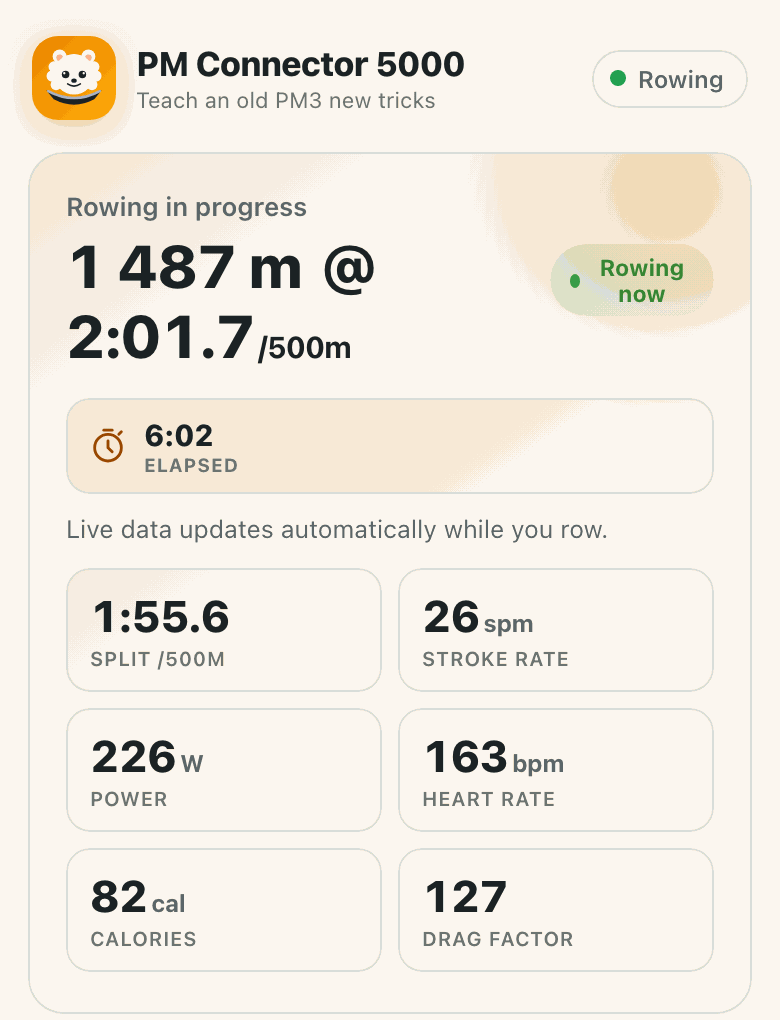
Live rowing screen on the on-device dashboard, showing distance, split, stroke rate, power, heart rate and calories updating in real time. Live rowing screen on the on-device dashboard, showing distance, split, stroke rate, power, heart rate and calories updating in real time.

Partner mode: a live dashboard while you row

If you love rowing, you might row too long. Now someone can check on you.

Read more

Anyone on the same wifi network can open the dashboard and see your live pace, distance and how much longer you’ll be, right from their own phone or laptop. No app to install.

PM Connector 5000 ErgData EXR Kinomap ErgZone MyWhoosh

Works with the apps you already use

It looks like a PM5 to all of them, so whatever you already row with keeps working.

Read more

ErgData, EXR, Kinomap, ErgZone, MyWhoosh, ErgArcade and Regatta all connect the same way they would to a real PM5. No new account, no new app to learn.

Row. That’s the whole workflow. No app to open first, no phone required. Finish rowing and the workout is already saved.
Auto-uploads while you towel off. On its way to Strava (and, soon, the Concept2 Logbook) within minutes, no manual step.
A monitor you can trust. Every number traces back to something the PM3 actually measured. If the monitor and this device ever disagree, the monitor is right.
Racing. A race run from an ErgRace-style client comes back with the monitor’s own splits and standings.
Programs a workout for you. Set a distance or time goal in ErgData and the PM3 gets programmed to match.
Easy setup that anyone can follow. Flash it from a browser, connect it to wifi, and you’re done. No technical stuff, unless you want it.
Over the air updates. You can turn them on, but by default the device doesn’t phone home.

Your data stays yours

Everything lives on the device itself. Talk to Strava or the Concept2 Logbook and it’s a direct line, nothing routes through us.
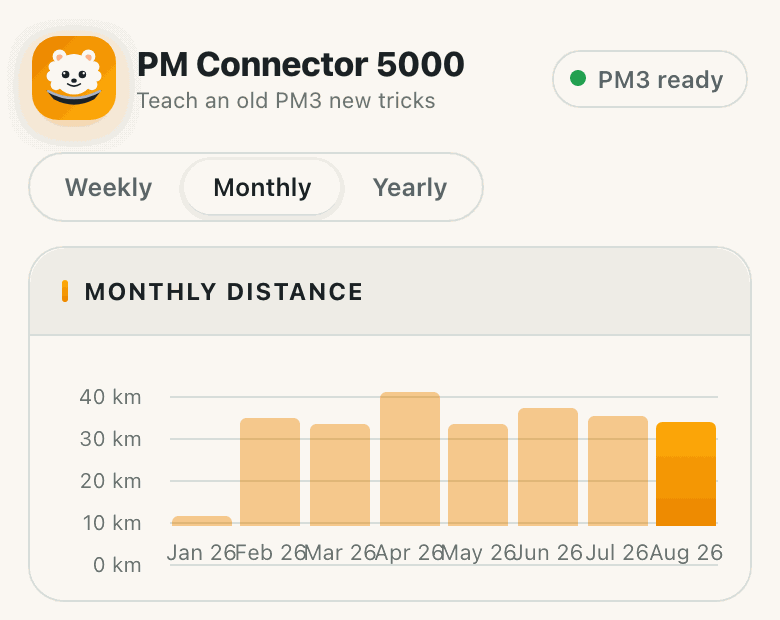
On-device stats dashboard showing a monthly distance chart and a table of workouts, time and distance per month. On-device stats dashboard showing a monthly distance chart and a table of workouts, time and distance per month.

A full stats dashboard, self-hosted on the device

Trends, personal bests and activity history, all served from the device itself.

Read more

Trends, personal bests at every standard distance, activity calendars and per-stroke force curves, all served from the device on your own network. Nothing is sent anywhere to compute it.

Wi-Fi, direct PM Connector 5000 Strava Our servers

Talks directly to Strava, never through us

Every upload goes straight from the device to Strava. We never get read access to your account.

Read more

Connecting your account is a one-time authorization. After that, every upload goes straight from the device to Strava’s servers. We never get read access to your Strava data, and nothing about your rowing passes through any server we run.

A local logbook that’s actually yours. Years of history, no subscription, no account required to keep rowing or to see your own numbers.
No USB stick, no app, no Bluetooth required at all, if that’s what you want. Export your whole logbook to a plain USB flash drive and read it with Concept2’s own Utility software.
Take your data with you. A one-file backup of your entire logbook, plus a CSV export you can drop into a spreadsheet.
Works with no internet at all. The dashboard runs entirely over your own wifi network. Only the optional cloud stuff ever leaves it.

Already set up?

The firmware itself is open source, built on ESPHome, and updates itself over WiFi once it’s set up. The documentation covers setup, the status LED and the optional extra hardware.